
How to Add a Single Healthcare Facility
Click on the Add Facility button.

In the pop-up window, enter the requested information in the appropriate data fields.To see a description of each field, see the table below.
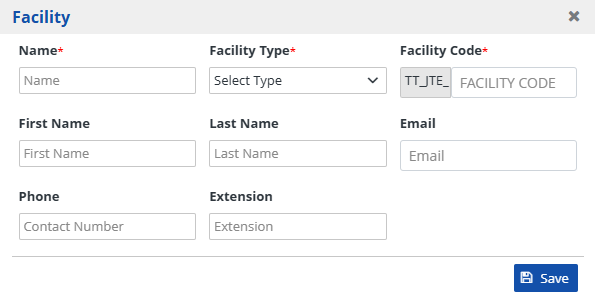
Click on the Save button to save the populated information.

| Heading | Description |
|---|---|
| Name | Individual facility's name. |
| Facility Type | Individual facility type. Options include:
|
| Facility Code | Code specific to this individual facility. The HCE code is auto-populated, but the facility code is entered as an alphanumeric value. |
| First Name | Contact person's first name at this individual facility. |
| Last Name | Contact person's last name at this individual facility. |
| Contact person's email at this individual facility. | |
| Phone | Contact person's phone number at this individual facility. |
| Extension | Contact person's phone number extension at this individual facility, if any. |