
Integration Requests
The Integration Requests feature enables State PDMP Administrators to view and manage connection requests submitted by Healthcare Entities (HCEs) within their state.
Healthcare Entities interested in joining the RxCheck network must complete and submit the RxCheck HCE Integration Form. Once submitted, the request will appear in the state's RxConsole application under the Integration Requests section.
State PDMP Administrators are responsible for reviewing each request to determine the eligibility of the HCE for participation in the RxCheck network. Based on this review, the administrator may choose to approve or deny the integration request.
The screenshot below shows a list of integration requests received by a PDMP state system. The accompanying table provides detailed definitions of each column heading presented in the interface.
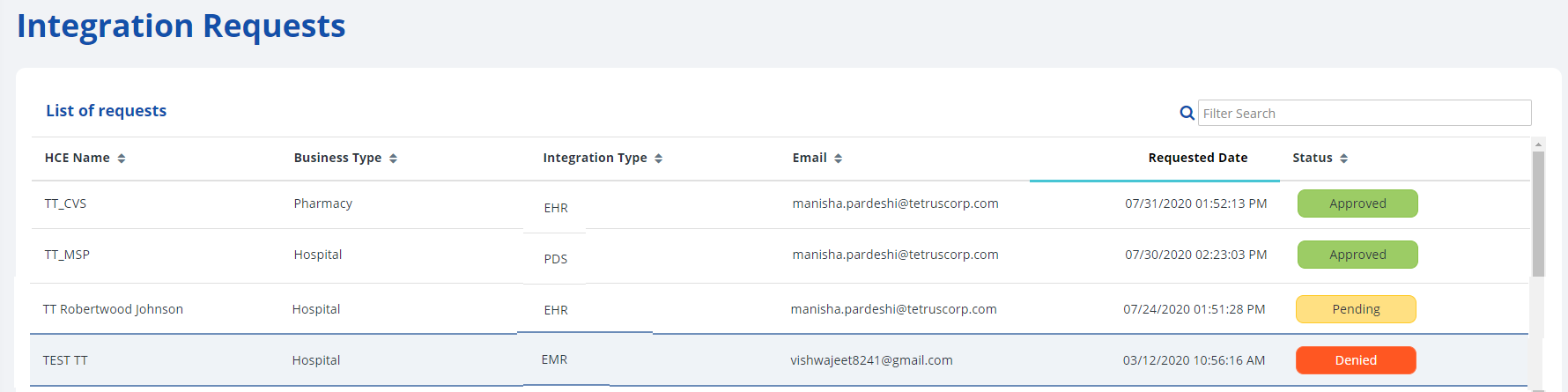
| Heading | Description |
|---|---|
| HCE Name | The name of the healthcare entity. |
| Business Type | The business type of the healthcare entity. For example, Hospital or Pharmacy. |
| Integration Type | The integration type requested by the healthcare entity. For example, NCPDP. |
| The business email of the healthcare entity for communication purposes. | |
| Requested Date | The date and time that the HCE integration request was submitted. |
| Status | The current state of the HCE integration request. For example, Approved, Pending, or Denied. |
The following subsection contains step-by-step instructions on how to view and search for integration requests in the RxConsole application. For additional clarity, each step is accompanied by a corresponding image or screenshot that depicts the action described.