
User Administration
This section lists details of the administrator(s) specific to this healthcare facility.

| Heading | Description |
|---|---|
| The email address used by the user to log into the RxConsole application. | |
| Name | The first and last name of the HCE user. |
| Site Name | The HCE site code. |
| Status | The status of the HCE user account. |
| User Type | The type of account the HCE user has. This is typically displayed as SUB_ADMIN. |
A State PDMP Administrator is allowed to add a new administrative user for a HCE following the steps below.
Click the Add User button to open a popup window.

In the popup window, enter the requested information into the appropriate data field.
A description of each field is available in the following table.
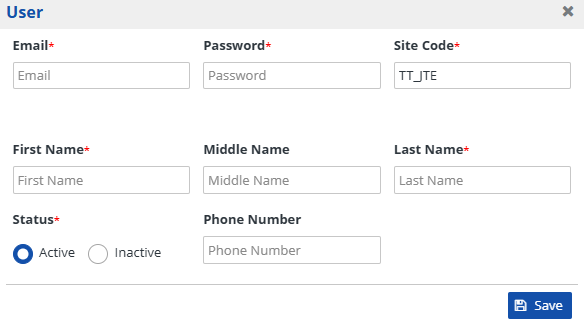
Click the Save button to save the information populated in the fields.

| Heading | Description |
|---|---|
| The contact email for the HCE user and username for RxConsole. | |
| Password | The password for the HCE user to access the RxConsole application. |
| Site Code | The site code for the HCE user. This field will be auto-populated. |
| First Name | The HCE user's first name. |
| Middle Name | The HCE user's middle name. |
| Last Name | The HCE user's last name. |
| Status | The status of this HCE user's account. Can be set to either Active or Inactive. |
| Phone Number | The HCE user's phone number. |