
Exporting the Logs to an sFTP Server
RxConsole enables PDMP Administrators to export RxCheck Hub Audit Logs to their state's sFTP server by providing the required sFTP configuration—hostname, port, username, and password—via the "Log Extract" section on the Hub Audit Logs page.
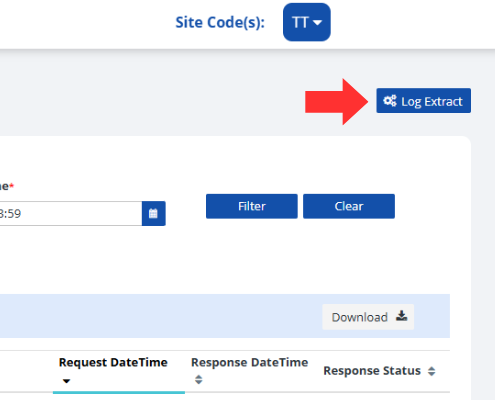
After clicking the Log Extract button, you will see the following window.
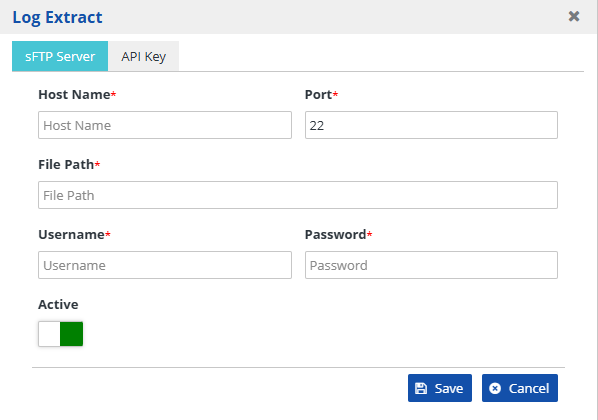
The following table includes a description of each of the fields available.
| Field | Description |
|---|---|
| Host Name | The domain name or IP address of the remote SFTP server. Example: sftp.example.com or 192.168.1.100. |
| Port | The port number used for the sFTP connection. The default is "22", but it can be configured to other values by the server administrator. |
| File Path | The directory path on the remote server where files will be uploaded to or downloaded from. Example: /home/sftp,_user/uploads, or /data/incoming. |
| Username | The login name used to authenticate the user with the SFTP server. It is typically assigned by the server administrator. |
| Password | The secret key or password corresponding to the username for authentication. This can be omitted if key-based authentication is used. |
| Active | Allows a user to enable and disable the log extract function. When the box is green, it is enabled. When red, the functionality is disabled. |
| After the sFTP configuration is saved, the system will activate the Export Logs (sFTP) button for the PDMP Administrator. To initiate the log export, click this button. The system will process the request and send an email notification once the export is complete. |
|