Sign in to the RxConsole Application
Personal login credentials are required to log into the RxConsole application. Login credentials will be provided to the state PDMP administrators during the onboarding process. For further inquiries regarding your login credentials, please contact the RxCheck help desk as described in the Contact the RxCheck Team section.
-
-
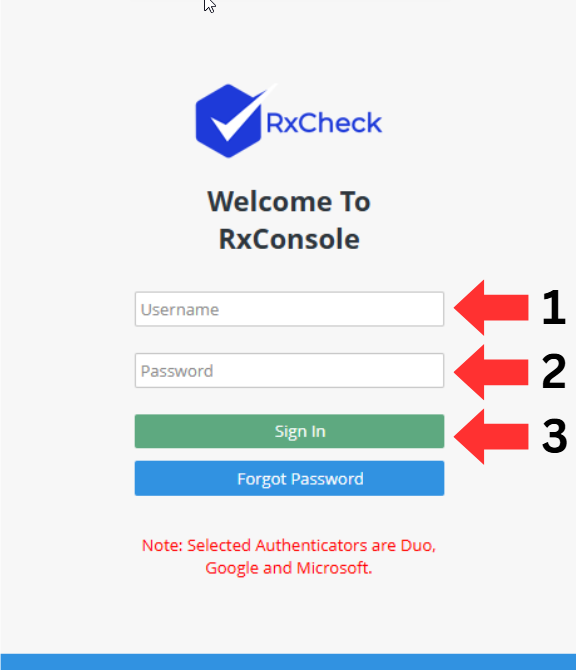
Enter your RxCheck username in the first text box.
-
Enter your RxCheck Password in the second text box.
-
Click on the Sign In button.
-
-
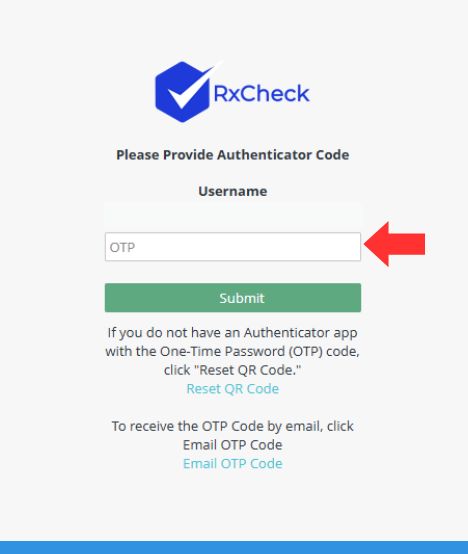
Users can receive the one time password (OTP) two ways:
- Click Email OTP Code on the login screen to have the code sent to their login email.
- Use one of the three approved authenticator apps to generate the OTP on their mobile device.

-
To view the OTP code on a mobile device, install Google, Microsoft, or Duo Authenticator from:
- The Play Store (Android)
- The App Store (iPhone)
-
Enter the OTP code from the email or authenticator app and click on the Submit button.