
Approving Interstate Data-Sharing for Healthcare Entities
This feature enables State PDMP Administrators to grant or deny interstate data sharing access to individual Healthcare Entities (HCEs) within any state that has an established bilateral data sharing agreement.
Upon selecting a site, the administrator will see a list of HCEs associated with that site, along with their respective site configuration details. The administrator can then review each entity and determine whether to authorize it for interstate data-sharing with the administrator's state.
The screenshot below shows an example list of HCEs associated with the site "QQ". Selecting a healthcare entity reveals an expanded view displaying the site's configuration and facility information. The accompanying table provides definitions for each column heading shown in the screenshot.
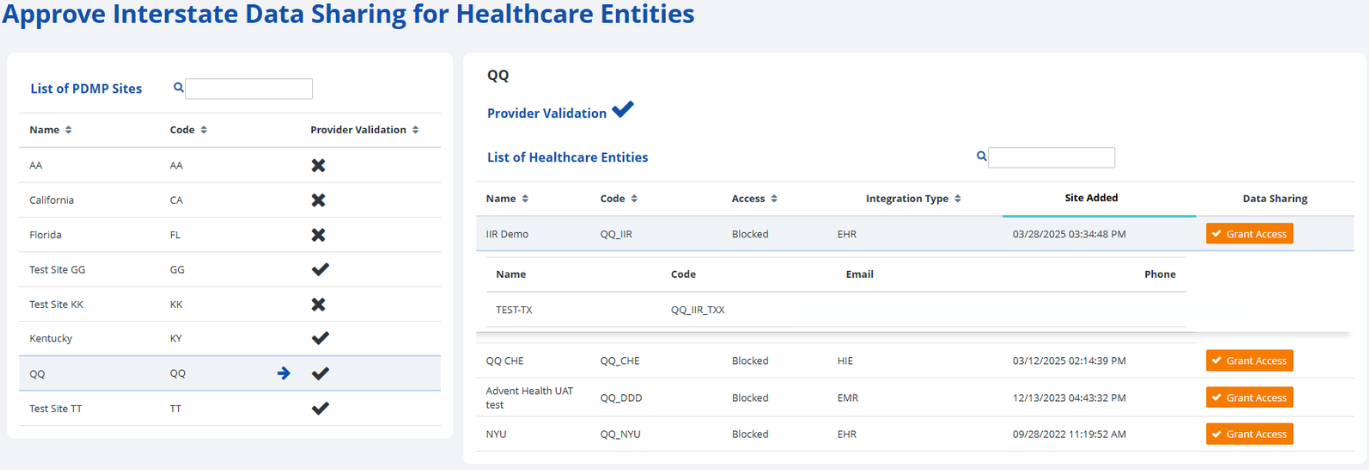
| Heading | Description |
|---|---|
| Name | The name of the PDMP site. |
| Code | The site code associated with the PDMP site. |
| Provider Validation | An icon indicating if that PDMP site has provider validation enabled in RxConsole. An X indicates that provider validation is disabled for this site, while a ✔ indicates that provider validation is enabled. |
| Heading | Description |
|---|---|
| Name | The name of the healthcare entity. |
| Code | The site code of the healthcare entity. |
| Access | The access level granted to the HCE by the PDMP state for interstate data-sharing. |
| Integration Type | The integration / site type of the HCE, such as EHR, EMR, HIE, or PDS. |
| Site Added | The date and time when the HCE was added. |
| Data Sharing | The options to grant or deny access to the HCE for interstate data-sharing permissions. |
| Heading | Description |
|---|---|
| Expanded Line – Name | The name of the facility under the selected HCE record. |
| Expanded Line – Code | The facility code of the facility record. |
| Expanded Line – Email | The email address of the facility for communication purposes. |
| Expanded Line – Phone | The phone number of the facility. |
| If a healthcare entity shows a blue Deny Access button under Data Sharing, it currently has interstate data sharing access. Clicking the button will revoke this access. |  |
| If it shows an orange Grant Access button, the entity does not have access. Clicking it will grant interstate data sharing permission. |  |
The following subsection contains step-by-step instructions on how to approve interstate data sharing for healthcare entities in the RxConsole application. For additional clarity, each step is accompanied by a corresponding image or screenshot that depicts the action described.