
SRS Inbound Sender Endpoint
The SRS Inbound Sender Endpoint configuration enables the State PDMP system to receive incoming queries initiated by other states. To complete this configuration, the State PDMP Administrator must input the required information into the specified data fields within this section.
The screenshot below illustrates the configuration interface for the Inbound Sender Endpoint. For additional clarity, the following table provides detailed descriptions of each data field shown in the screenshot.
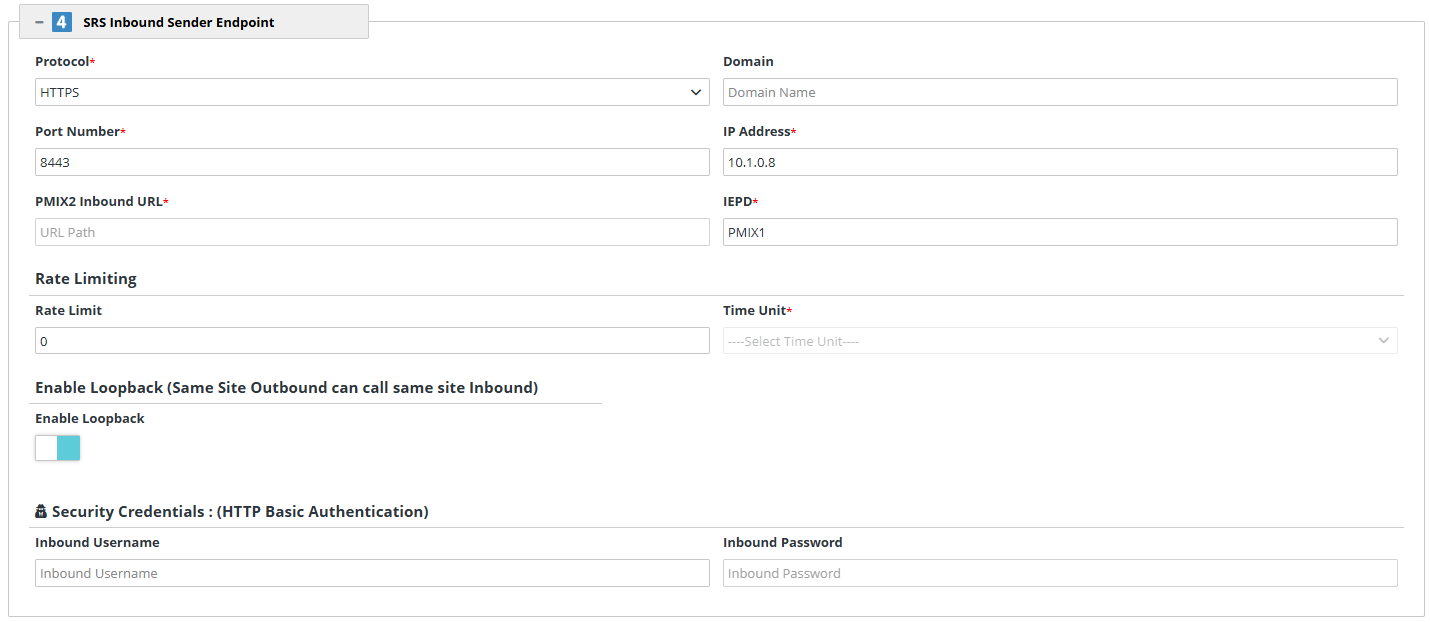
| Heading | Data Field Name | Description |
|---|---|---|
| Protocol | This value can be set to "HTTP" or "HTTPS". | |
| Domain |
The official website address of the PDMP's Inbound Service instance. This field is optional – if the domain is not provided, the system will automatically take the IP address. |
|
| Port Number | Port number where the Inbound Service is configured. | |
| IP Address | IP address where the Inbound SRS is hosted. | |
| PMIX2 Inbound URL | This field is auto-populated based on the values selected/entered in the Protocol, Domain, IP address, and Port number fields. It is a fully qualified URL for PMIX2 NIEM4 Service on Inbound. | |
| IEPD | This field is auto-populated based on the IEPD option selected by Super Administrator at the time of PDMP Site creation. The value indicates the type of PDMP site. This indicates the PMIX version supported by PDMP. | |
| Rate Limiting | Rate Limit | If a value is entered for this field, it indicates the number of Requests to the inbound with respect to the defined time unit. |
| Rate Limiting | Time Unit | Defines the unit for the value entered in the Rate Limit field. Can be set to Second, Minute, Hour, Day, or Month. |
| Enable Loopback (Same Site Outbound can call same site inbound) | Enable Loopback |
This is a toggle button. When enabled (blue), it indicates that the users in the PDMP state can make Prescription Data requests to the same PDMP State. For example, if it is enabled for the PDMP State of NJ, it will indicate that NJ users can send the Prescription Data Requests to NJ. If the box is gray, it is disabled. |
| Security Credentials (HTTP Basic Authentication) | Inbound Username | A username to authenticate the SRS connection in the RxCheck network. |
| Inbound Password | A password to authenticate the SRS connection in the RxCheck network. |