
Interstate Data-Sharing – Role Management
The Role Management feature within the Interstate Data Sharing module enables State PDMP Administrators to control which user roles within an authorized state are permitted to submit prescription data requests for individual patients.
Administrators can selectively grant or restrict this capability based on the role designation of the requesting party.
The screenshot below displays two lists titled Authorized Roles and Selected Roles for the site "Florida-FL".
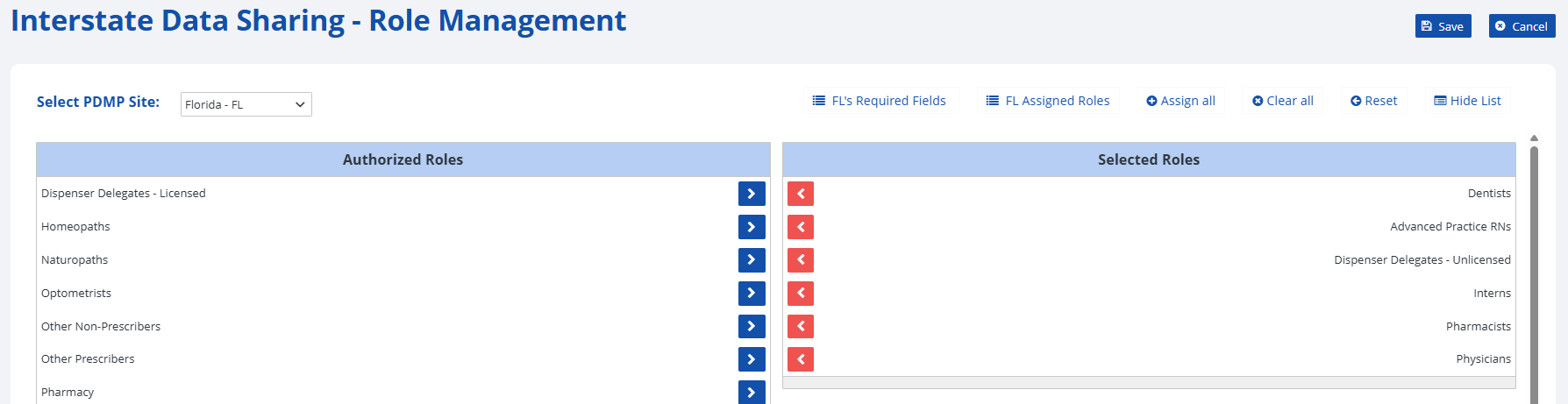
The Authorized Roles list (left) shows roles from Florida (FL) that do not have permission to request prescription data (e.g., Homeopaths, Optometrists). Users with these roles cannot send successful requests to the disclosing state.
The Selected Roles list (right) includes FL roles that are authorized for bilateral data exchange (e.g., Pharmacists, Physicians). Users with these roles can send and receive data successfully.
The following subsections contain step-by-step instructions on how to select and deselect roles for interstate data sharing in the RxConsole application. For additional clarity, each step is accompanied by a corresponding image or screenshot that depicts the action described.