
PDMP Maintenance Schedule
The Maintenance Schedule feature in RxConsole enables State PDMP Administrators to create and manage scheduled maintenance events. These events may include activities such as application updates, software installations, or operating system configurations.
During a maintenance window, the PDMP system will be taken offline, meaning it will not be able to process incoming requests or generate responses. If a request is received during this time, the system will return an error code "DM", indicating a processing error due to scheduled maintenance. Once the maintenance period concludes, the system will resume normal operations and process all pending and new requests.
The screenshot below shows an example Maintenance Schedule for a test site, "TT". The accompanying table provides descriptions for each column heading displayed in the interface.
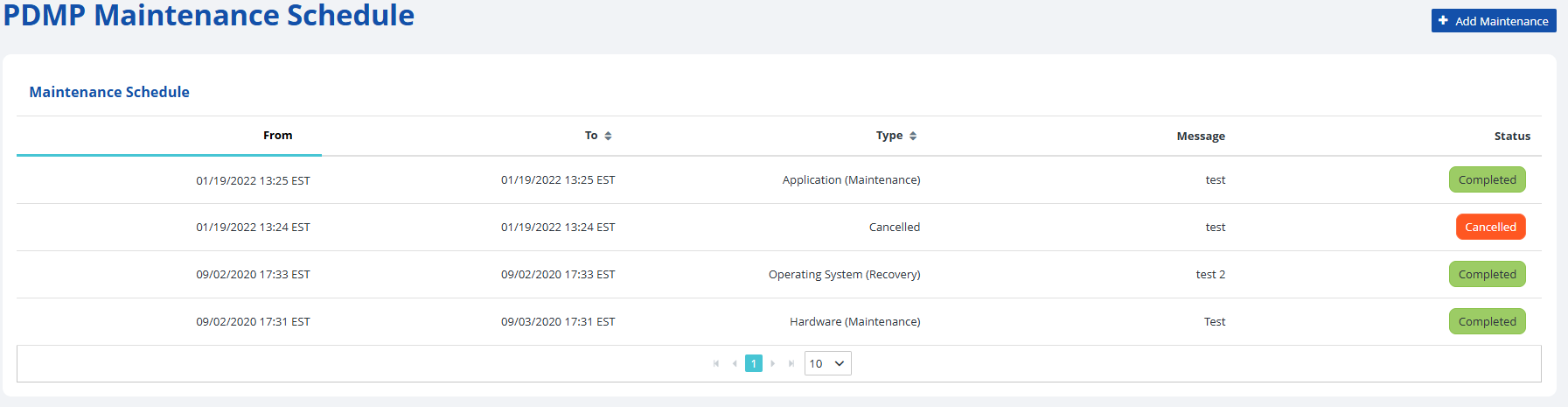
| Heading | Description |
|---|---|
| From | The date and time for when the maintenance event will begin. |
| To | The date and time for when the maintenance event will end. |
| Type | The event type for which the maintenance event is scheduled. |
| Message | The user can add an informative note about the respective event. |
| Status | The status of the scheduled event, such as "Completed" or "Cancelled". |
The following subsection contains step-by-step instructions on how to add a PDMP maintenance schedule entry in the RxConsole application. For additional clarity, each step is accompanied by a corresponding image or screenshot that depicts the action described.