
Read the Hub Audit Logs
The following screenshot displays two hub audit log entries.

Clicking on the blue hyperlink text will display additional information about its column.
For example, clicking on View will display the following Log Summary pop-up page. The Log Summary contains additional information about the respective transaction and may add further insight (in the "Message" section) as to why a transaction was not successful.
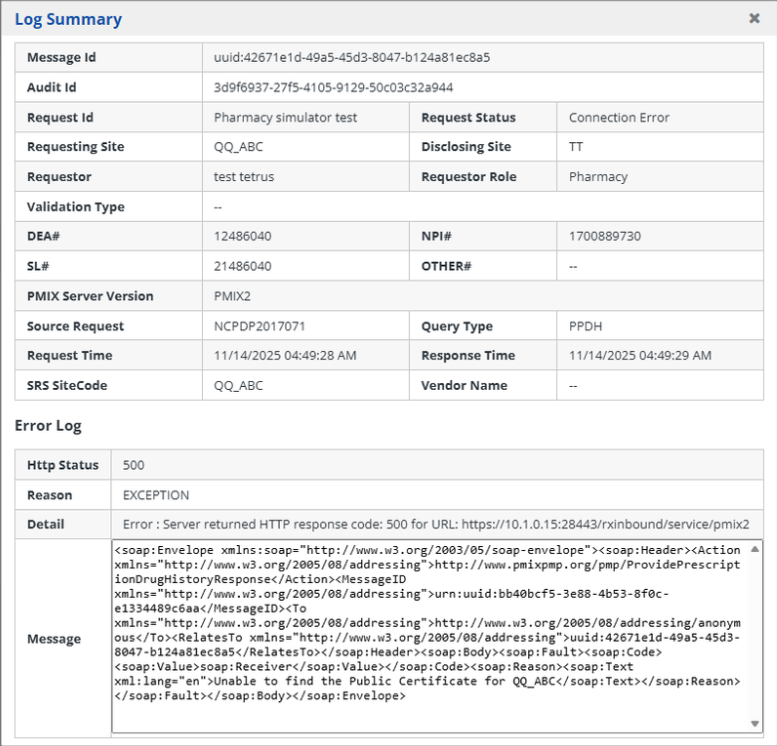
The following table details the role of each column title displayed in the Hub Audit Log.
| Title | Description |
|---|---|
| Summary | Provides details about the transaction and any errors. |
| Request ID | The ID provided in a request transaction that is made to obtain prescription data of an individual patient. |
| Requesting Site | The state code of the State that initiated the data request. |
| Disclosing Site | The state code of the State to which the data request is being sent to. |
| Requestor | The name of the healthcare professional who submitted the request. |
| Role | The role of the healthcare professional who submitted the request. |
| DEA | The Drug Enforcement Administration number of the healthcare professional who submitted the request. |
| NPI | The National Provider Identification number of the healthcare professional who submitted the request. |
| SLN | The State License number of the healthcare professional who submitted the request. |
| Request DateTime | The date and time the request was initiated. |
| Response DateTime | The date and time the response was sent. |
| Response Status | The status of the transaction. |
The following table describes what each of the available Request Status options translates to.
| Status | Description |
|---|---|
| Provided | A query was received, and a result was returned without issue. |
| Deferred | The response cannot be returned at this time. This may be caused by the request going to a manual process (placed in a queue for a person to review and reconcile) in a state PDMP system. |
| Not Found | A query was received, but a patient match was not found. In some cases, Not Found will also be the response when too many patients were found and a guaranteed match could not be established. |
| Disallowed | The requesting user’s role is not permitted in the state from which they are requesting information. |
| Invalid Document | *Internal only- for debugging purposes |
| Invalid Response | *Internal only- for debugging purposes |
| No Route Found | There is no message route found to forward the request to a PDMP. |
| Access Denied | A query was received, but the disclosing state denied the request (often due to not allowing the requestor's role access to data). |
| Outbound Certificate Expired | The sending state's certificate has expired. |
| Inbound Certificate Expired | The receiving state's certificate has expired. |
| Invalid Site Code | An invalid site code was sent in the message. |
| Max Limit Reached | When the number of messages reaches the threshold that the PDMP Administrator sets in the hub. |
| Timeout | The request timed out while waiting for the response. |
| Connection Error | There was an error connecting the requesting entity to the SRS. |
| Validation Failed | A query was received, but the requestor did not pass validation rules set up in the RxConsole for the state. |
| Version Mismatch | Differences in the versions of the hub software being used by two states cause an error. |
| Error | An error occurred in request process either at the PDMP or hub level. This status would include hub or PDMP system errors as well as externally created faults. The hub should also send the specific error text. |
| Connection Reset | There is a TCP/IP connection reset that occurred. |
| Service Not Available | Displays when any of the internal services are not available to process the message. |
| Site not found | An invalid site code was sent in the message. |